API DocsChat API
Chat API
Chat Completions, Messages (Anthropic) und Responses. OpenAI- und Anthropic-Drop-in, Streaming, Function Calling.
Chat Completions, Messages (Anthropic) und Responses. OpenAI- und Anthropic-Drop-in, Streaming, Function Calling.
Sende Chat-Nachrichten und erhalte eine KI-generierte Antwort.
/api/v1/llm/chat/completionsSDK-Kompatibilität
| Parameter | Type | Description |
|---|---|---|
modelrequired | string | ID des Modells, z.B. gpt-4o oder claude-sonnet-4-20250514. |
messagesrequired | array | Array von Nachrichten mit role und content. |
stream | boolean | Wenn true, wird die Antwort per SSE gestreamt. |
temperature | number | Kreativität der Antwort (0–2). Niedrigere Werte = fokussierter. |
max_tokens | integer | Maximale Anzahl an Tokens in der Antwort. |
top_p | number | Nucleus-Sampling — Alternative zu temperature. |
response_format | object | Erzwingt ein bestimmtes Ausgabeformat (z.B. JSON). |
tools | array | Liste von Tools/Funktionen, die das Modell aufrufen kann. |
tool_choice | string | Steuert, ob und welche Tools aufgerufen werden. |
frequency_penalty | number | Bestraft häufig verwendete Tokens (-2 bis 2). |
presence_penalty | number | Bestraft bereits verwendete Tokens (-2 bis 2). |
stop | string | array | Sequenzen, bei denen die Generierung stoppt. |
cache_control | object | Nur Claude-Modelle: ein Prompt-Caching-Breakpoint. Top-Level für automatisches Caching, oder an einem Tool, einer Nachricht oder einem Content-Part. |
prompt_cache_key | string | Optionaler Schlüssel, der zusammengehörige Requests auf denselben Cache lenkt (OpenAI-Parameter). Für die Weiterleitung nutzt anymize nur einen Hash davon; den Schlüssel selbst bekommen im Body nur OpenAI und Mistral, die den Parameter kennen. Lässt du ihn weg, bildet anymize einen je Unterhaltung. |
Jede Nachricht hat eine Rolle (system, user, assistant) und einen Inhalt.
[
  {
    "role": "system",
    "content": "You are a helpful assistant."
  },
  {
    "role": "user",
    "content": "What is the capital of France?"
  },
  {
    "role": "assistant",
    "content": "The capital of France is Paris."
  },
  {
    "role": "user",
    "content": "And Germany?"
  }
]Minimaler Request mit einer User-Nachricht.
1curl -X POST https://app.anymize.ai/api/v1/llm/chat/completions \2 -H "Authorization: Bearer YOUR_API_KEY" \3 -H "Content-Type: application/json" \4 -d '{5 "model" : "fountain-1 .0 " ,6 "messages" : [7 {"role" : "system" , "content" : "You are a helpful assistant." },8 {"role" : "user" , "content" : "Explain quantum computing in one sentence." }9 ],10 "temperature" : 0 .7 ,11 "max_tokens" : 256 12 }'Die Antwort enthält die generierte Nachricht, Modell-Info und Token-Verbrauch.
{
  "id": "chatcmpl-abc123",
  "object": "chat.completion",
  "created": 1700000000,
  "model": "fountain-1.0",
  "choices": [
    {
      "index": 0,
      "message": {
        "role": "assistant",
        "content": "Quantum computing uses quantum-mechanical phenomena like superposition and entanglement to process information in ways that classical computers cannot."
      },
      "finish_reason": "stop"
    }
  ],
  "usage": {
    "prompt_tokens": 28,
    "completion_tokens": 24,
    "total_tokens": 52
  }
}Jede Antwort enthält prompt_tokens, completion_tokens und total_tokens.
Wiederholte Präfixe (System-Prompt, Tools, bisheriger Verlauf) liest das Modell aus dem Cache, statt sie neu zu verarbeiten. Bei Claude-Modellen schaltet anymize das automatisch ein, sobald ein Request Tools oder eine frühere Assistant-Antwort enthält. Einmalige Requests bleiben ohne Cache, weil sich ein Schreibvorgang dort nie auszahlt.
Du willst selbst steuern? Setze cache_control wie bei OpenRouter: top-level für automatisches Caching, an einem Tool, an einer Nachricht (gilt für deren Ende) oder an einem Content-Part. Deine Breakpoints gehen vor, anymize fügt dann keine eigenen hinzu. Maximal vier pro Request, ttl ist 5m (Standard) oder 1h. Für alle anderen Modelle entfernt anymize das Feld.
{
  "model": "anthropic/claude-sonnet-4.6",
  "messages": [
    {
      "role": "system",
      "content": [
        {
          "type": "text",
          "text": "You are a contract review assistant. <long, stable instructions>",
          "cache_control": {
            "type": "ephemeral"
          }
        }
      ]
    },
    {
      "role": "user",
      "content": "Check clause 7 for liability caps."
    }
  ]
}
Im usage-Objekt stehen die Cache-Werte unter prompt_tokens_details: cached_tokens hat das Modell aus dem Cache gelesen, cache_write_tokens neu in den Cache geschrieben. Bei Claude nennt cache_write_1h_tokens zusätzlich den Teil von cache_write_tokens, der mit ttl 1h geschrieben wurde; gibt es keinen, fehlt das Feld. prompt_tokens enthält cached_tokens und cache_write_tokens.
{
  "usage": {
    "prompt_tokens": 12450,
    "completion_tokens": 210,
    "total_tokens": 12660,
    "prompt_tokens_details": {
      "cached_tokens": 12000,
      "cache_write_tokens": 400
    }
  }
}
Abrechnung
OpenAI-, Gemini-, Mistral-, Grok- und Waterfall-2-Modelle cachen ohne Breakpoints. Wo der Anbieter einen Schlüssel kennt, schickt anymize einen je Unterhaltung mit, damit zusammengehörige Requests denselben Cache treffen. Mit prompt_cache_key legst du ihn selbst fest.
Wenn du voranonymisierte Texte an den normalen Chat-Endpoint schickst, muss das Modell die [[Typ-HASH]] Platzhalter exakt beibehalten. Füge dazu den folgenden System-Prompt hinzu.
Ohne Prompt
Sehr geehrter [Name anonymisiert], bezüglich Ihres Anliegens...
Mit Prompt
Sehr geehrter Herr [[Person-ABC123]], bezüglich Ihres Anliegens...
Ohne explizite Anweisung ersetzt das Modell die Platzhalter durch generische Beschreibungen wie '[anonymisiert]'. Das zerstört die Zuordnung für die De-Anonymisierung.
Wenn du voranonymisierte Texte verarbeitest, füge diesen Teil zu deinem System-Prompt hinzu:
1const response = await client.chat.completions.create({2 model: "fountain-1 .0 " ,3 messages: [4 {5 role: "system" ,6 content: `## CRITICAL RULE: ANONYMIZATION PLACEHOLDERS78The user's messages contain anonymized placeholders shaped [[<Type>-<HASH>]],9where <Type> is the PII category (person, email, iban, telephone_number, ...)10and <HASH> is a short random code.1112FORBIDDEN:13- Writing "[Name anonymisiert]" or "[anonymized]" 14- Describing WHAT the placeholder is instead of USING it15- Writing a double-bracket token that was NOT in the user's message — the hash16 is a database key, so an invented one resolves to nothing.1718REQUIRED:19- Copy each placeholder character-for-character from the user's message20- Use it inline like the real value: "Herr <placeholder> hat..." 21- Need a value the user never gave you? Use SINGLE brackets ([Name]).2223WHY: After your response, placeholders get replaced with real values.`,24 },25 {26 role: "user" ,27 content: "Schreibe eine E-Mail an [[Person-ABC123]] bezuglich dem Vertrag." ,28 },29 ],30})3132// Model responds: "Sehr geehrter Herr [[Person-ABC123]], ..." 33// After de-anonymization: "Sehr geehrter Herr Max Mustermann, ..." Oder nutze den anonymen Endpoint
POST /api/v1/messages ist der Anthropic-Pfad. Base URL https://app.anymize.ai/api, dann ruft der Client /v1/messages auf. Dieselbe Anonymisierung, dieselben Credits, dieselben Modelle wie bei Chat Completions.
/api/v1/messagesSDK-Kompatibilität
Drei Pfade, ein Handler. So landen alle gängigen Base-URL-Konventionen auf derselben Pipeline.
https://app.anymize.ai/api/v1/messageshttps://app.anymize.ai/api/v1/llm/messageshttps://app.anymize.ai/api/v1/llm/v1/messagesAuthorization: Bearer ANYM_... oder x-api-key: ANYM_... Claude Code muss ANTHROPIC_AUTH_TOKEN nutzen (Bearer). ANTHROPIC_API_KEY schickt x-api-key und scheitert an manchen Custom-Gateway-Pfaden. Unset ANTHROPIC_API_KEY, wenn du umstellst.
1-H "Authorization: Bearer YOUR_API_KEY" | Parameter | Type | Description |
|---|---|---|
modelrequired | string | Modell-ID, z. B. anthropic/claude-sonnet-4.6 oder openai/gpt-5.4. Dieselben IDs wie bei Chat Completions. |
messagesrequired | array | Array aus user- und assistant-Nachrichten. Content als String oder Blocks (text, image, tool_use, tool_result). |
max_tokensrequired | integer | Pflichtfeld bei Anthropic. Wenn es fehlt, setzt anymize 4096. |
system | string | array | String oder Array aus Text-Blocks. Wird zur OpenAI-System-Message. |
stream | boolean | true liefert Anthropic SSE. Usage kommt im message_delta. |
temperature | number | Kreativität der Antwort (0-2). Wird 1:1 an Completions durchgereicht. |
top_p | number | Nucleus-Sampling. Wird 1:1 an Completions durchgereicht. |
tools | array | Anthropic tools (name + input_schema) und Client-Tools wie bash_20250124. Werden zu OpenAI functions. |
tool_choice | object | auto, any (required), none oder ein konkretes Tool per Name. |
stop_sequences | array | stop_sequences werden zu OpenAI stop. |
thinking | object | thinking.budget_tokens mappt auf reasoning.effort (low / medium / high). |
cache_control | object | Top-level für automatisches Caching. cache_control an System-Blocks, Tools und Content-Blocks übernimmt anymize für Claude-Modelle; ein Breakpoint gilt dann für das Ende seiner Nachricht bzw. des System-Prompts. |
1curl https://app.anymize.ai/api/v1/messages \2 -H "x-api-key: YOUR_API_KEY" \3 -H "anthropic-version: 2023 -06 -01 " \4 -H "content-type: application/json" \5 -d '{6 "model" : "anthropic/claude-haiku-4 .5 " ,7 "max_tokens" : 256 ,8 "messages" : [{ "role" : "user" , "content" : "Hello" }]9 }'Anthropic Message: id, role assistant, content-Blocks, stop_reason, usage.input_tokens / output_tokens.
{
  "id": "msg_01abc",
  "type": "message",
  "role": "assistant",
  "model": "anthropic/claude-haiku-4.5",
  "content": [
    {
      "type": "text",
      "text": "Hello"
    }
  ],
  "stop_reason": "end_turn",
  "stop_sequence": null,
  "usage": {
    "input_tokens": 12,
    "output_tokens": 4,
    "cache_read_input_tokens": 0,
    "cache_creation_input_tokens": 0
  }
}Der Stream folgt Anthropic: message_start, content_block_start/delta/stop, message_delta (Usage + Stop-Reason), message_stop. Tool-Calls kommen als tool_use-Blocks mit partial_json.
Claude Code und das Anthropic SDK setzen cache_control selbst. anymize reicht diese Breakpoints an Claude weiter, statt sie zu verwerfen. Ohne eigene Breakpoints schaltet anymize automatisches Caching für Requests mit Tools oder Verlauf ein. Ein Breakpoint innerhalb einer Nachricht rückt an deren Ende, maximal vier pro Request.
{
  "model": "anthropic/claude-sonnet-4.6",
  "max_tokens": 1024,
  "system": [
    {
      "type": "text",
      "text": "You are a contract review assistant. <long, stable instructions>",
      "cache_control": {
        "type": "ephemeral"
      }
    }
  ],
  "messages": [
    {
      "role": "user",
      "content": [
        {
          "type": "text",
          "text": "Check clause 7 for liability caps.",
          "cache_control": {
            "type": "ephemeral"
          }
        }
      ]
    }
  ]
}
usage folgt Anthropic: input_tokens sind die Tokens ohne Cache, cache_read_input_tokens die aus dem Cache gelesenen, cache_creation_input_tokens die neu geschriebenen. Im Stream kommen die finalen Werte im message_delta.
{
  "usage": {
    "input_tokens": 50,
    "output_tokens": 210,
    "cache_read_input_tokens": 12000,
    "cache_creation_input_tokens": 400
  }
}
Thinking-Blocks von Claude kommen mit Signatur zurück. Schick sie in der nächsten Runde unverändert mit, dann denkt das Modell mit demselben Kontext weiter.
Abrechnung
POST .../count_tokens schätzt Input-Tokens lokal, ohne Credits. Claude Code und das SDK rufen das vor dem eigentlichen Request. Die Abrechnung läuft weiter über Completions.
/api/v1/messages/count_tokensGET /api/v1/models mit Header anthropic-version (und GET /api/v1/llm/v1/models) liefert die Anthropic-Liste mit data und has_more. Dieselben IDs wie GET /api/v1/llm/models. Der In-App-Picker ohne diesen Header bleibt unverändert.
/api/v1/modelsGET /api/v1/llm/v1/models
Claude Code
Setze stream: true im Request, um Antworten in Echtzeit zu empfangen.
/api/v1/llm/chat/completionsAntworten kommen als Server-Sent Events — ein Chunk pro Zeile mit data:-Prefix.
data: {"id": "chatcmpl-abc123","object": "chat.completion.chunk","created": 1700000000,"model": "fountain-1.0","choices":[{"index": 0,"delta":{"content": "Hello"},"finish_reason": null}]}

data: {"id": "chatcmpl-abc123","object": "chat.completion.chunk","created": 1700000000,"model": "fountain-1.0","choices":[{"index": 0,"delta":{"content": " world"},"finish_reason": null}]}

data: {"id": "chatcmpl-abc123","object": "chat.completion.chunk","created": 1700000000,"model": "fountain-1.0","choices":[{"index": 0,"delta":{},"finish_reason": "stop"}]}

data: [DONE]Jeder Chunk enthält ein delta-Objekt mit dem neuen Textfragment.
{
  "id": "chatcmpl-abc123",
  "object": "chat.completion.chunk",
  "created": 1700000000,
  "model": "fountain-1.0",
  "choices": [
    {
      "index": 0,
      "delta": {
        "content": "Hello"
      },
      "finish_reason": null
    }
  ]
}Lies den Stream Zeile für Zeile und parse jede data:-Zeile als JSON.
1curl -X POST https://app.anymize.ai/api/v1/llm/chat/completions \2 -H "Authorization: Bearer YOUR_API_KEY" \3 -H "Content-Type: application/json" \4 -d '{5 "model" : "fountain-1 .0 " ,6 "messages" : [7 {"role" : "user" , "content" : "Write a short poem about the sea." }8 ],9 "stream" : true10 }'Der erste Chunk enthält typischerweise die Rolle und ein leeres Content-Delta.
{
  "id": "chatcmpl-abc123",
  "object": "chat.completion.chunk",
  "created": 1700000000,
  "model": "fountain-1.0",
  "choices": [
    {
      "index": 0,
      "delta": {
        "role": "assistant",
        "content": ""
      },
      "finish_reason": null
    }
  ]
}
Token-Info beim Streaming
Erzwinge strukturierte JSON-Ausgaben vom Modell — ideal für Datenextraktion und APIs.
Setze response_format auf json_object, um valides JSON zu erzwingen.
/api/v1/llm/chat/completions1curl -X POST https://app.anymize.ai/api/v1/llm/chat/completions \2 -H "Authorization: Bearer YOUR_API_KEY" \3 -H "Content-Type: application/json" \4 -d '{5 "model" : "fountain-1 .0 " ,6 "messages" : [7 {"role" : "system" , "content" : "You extract contact info. Respond in JSON with keys: name, email, phone." },8 {"role" : "user" , "content" : "My name is Anna Schmidt, email anna@example.com, phone +49 170 1234567 ." }9 ],10 "response_format" : {"type" : "json_object" }11 }'{
"id": "chatcmpl-abc123",
"object": "chat.completion",
"model": "fountain-1.0",
"choices": [
{
"index": 0,
"message": {
"role": "assistant",
"content": "{\"name\": \"Anna Schmidt\", \"email\": \"anna@example.com\", \"phone\": \"+49 170 1234567\"}"
},
"finish_reason": "stop"
}
],
"usage": {
"prompt_tokens": 42,
"completion_tokens": 28,
"total_tokens": 70
}
}Definiere das gewünschte Ausgabeschema und wähle ein Modell mit Schema-Unterstützung. Bekannte nicht unterstützte Transportwege antworten vor dem Modellaufruf mit HTTP 400 und unsupported_response_format. Ein Schema wird nicht still auf einen JSON-Wunsch abgeschwächt.
1curl -X POST https://app.anymize.ai/api/v1/llm/chat/completions \2 -H "Authorization: Bearer YOUR_API_KEY" \3 -H "Content-Type: application/json" \4 -d '{5 "model" : "fountain-1 .0 " ,6 "messages" : [7 {"role" : "user" , "content" : "List three European capitals with their countries and population." }8 ],9 "response_format" : {10 "type" : "json_schema" ,11 "json_schema" : {12 "name" : "capitals" ,13 "schema" : {14 "type" : "object" ,15 "properties" : {16 "capitals" : {17 "type" : "array" ,18 "items" : {19 "type" : "object" ,20 "properties" : {21 "city" : {"type" : "string" },22 "country" : {"type" : "string" },23 "population" : {"type" : "number" }24 },25 "required" : ["city" , "country" , "population" ]26 }27 }28 },29 "required" : ["capitals" ]30 }31 }32 }33 }'Prompt-Tipp
Mit Function Calling kann das Modell deine definierten Tools aufrufen. Statt nur Text zu generieren, erkennt das Modell, wann ein externes Tool hilfreich ist, und gibt dir die Parameter zurück. Du führst die Funktion lokal aus und schickst das Ergebnis zurück.
Der Ablauf in vier Schritten:
Web-Suche (Brave, Google, etc.)
Datenbank-Abfragen und CRM-Systeme
E-Mail und Messaging
Externe APIs (Wetter, Kalender, Maps, etc.)
Tools werden als JSON Schema definiert. Das Modell nutzt die Beschreibungen, um zu entscheiden, wann es welches Tool aufruft.
{
  "type": "function",
  "function": {
    "name": "web_search",
    "description": "Search the web for current information",
    "parameters": {
      "type": "object",
      "properties": {
        "query": {
          "type": "string",
          "description": "The search query"
        }
      },
      "required": [
        "query"
      ]
    }
  }
}Ein vollständiges Beispiel: Das Modell erkennt, dass aktuelle Informationen benötigt werden, ruft die Brave Search API auf, und fasst die Ergebnisse zusammen.
1import OpenAI from "openai" 23const client = new OpenAI({4 apiKey: "YOUR_API_KEY" ,5 baseURL: "https://app.anymize.ai/api/v1/llm" ,6})78const BRAVE_API_KEY = process.env.BRAVE_API_KEY910// Step 1 : Define the tool 11const tools = [12 {13 type: "function " as const ,14 function : {15 name: "web_search" ,16 description: "Search the web for current information. Use this when the user asks about recent events, news, or anything that requires up-to-date data." ,17 parameters: {18 type: "object" ,19 properties: {20 query: { type: "string" , description: "Search query" },21 },22 required: ["query" ],23 },24 },25 },26]2728// Step 2 : Send message with tools 29const response = await client.chat.completions.create({30 model: "fountain-1 .0 " ,31 messages: [32 { role: "user" , content: "What are the latest AI news today?" },33 ],34 tools,35 tool_choice: "auto" ,36})3738const message = response.choices[0 ].message3940// Step 3 : Check if the model wants to call a tool 41if (message.tool_calls && message.tool_calls.length > 0 ) {42 const toolCall = message.tool_calls[0 ]43 const args = JSON.parse(toolCall.function .arguments)4445 // Step 4 : Execute the Brave Search API 46 const searchResponse = await fetch(47 `https://api.search.brave.com/res/v1/web/search?q=${encodeURIComponent(args.query)}&count=5 `,48 { headers: { "X-Subscription-Token" : BRAVE_API_KEY } },49 )50 const searchData = await searchResponse.json()5152 // Format results for the model 53 const results = searchData.web?.results54 ?.map((r: any) => `${r.title}: ${r.description}`)55 .join("\n" ) || "No results found" 5657 // Step 5 : Send the search results back to the model 58 const finalResponse = await client.chat.completions.create({59 model: "fountain-1 .0 " ,60 messages: [61 { role: "user" , content: "What are the latest AI news today?" },62 message,63 {64 role: "tool" ,65 tool_call_id: toolCall.id,66 content: results,67 },68 ],69 })7071 console.log(finalResponse.choices[0 ].message.content)72}Wenn das Modell ein Tool aufrufen möchte, enthält die Antwort tool_calls statt Content. Der finish_reason ist dann 'tool_calls'.
{
  "id": "chatcmpl-abc123",
  "object": "chat.completion",
  "model": "fountain-1.0",
  "choices": [
    {
      "index": 0,
      "message": {
        "role": "assistant",
        "content": null,
        "tool_calls": [
          {
            "id": "call_abc123",
            "type": "function",
            "function": {
              "name": "web_search",
              "arguments": "{\"query\": \"latest AI news today\"}"
            }
          }
        ]
      },
      "finish_reason": "tool_calls"
    }
  ]
}
finish_reason beachten
Du kannst mehrere Tools definieren. Das Modell wählt automatisch das passende basierend auf der Nachricht.
1const tools = [2 {3 type: "function " ,4 function : {5 name: "web_search" ,6 description: "Search the web for current information" ,7 parameters: {8 type: "object" ,9 properties: {10 query: { type: "string" },11 },12 required: ["query" ],13 },14 },15 },16 {17 type: "function " ,18 function : {19 name: "get_weather" ,20 description: "Get current weather for a location" ,21 parameters: {22 type: "object" ,23 properties: {24 location: { type: "string" },25 },26 required: ["location" ],27 },28 },29 },30 {31 type: "function " ,32 function : {33 name: "send_email" ,34 description: "Send an email to a recipient" ,35 parameters: {36 type: "object" ,37 properties: {38 to: { type: "string" , description: "Email address" },39 subject: { type: "string" },40 body: { type: "string" },41 },42 required: ["to" , "subject" , "body" ],43 },44 },45 },46]4748// The model picks the right tool based on the user's message 49const response = await client.chat.completions.create({50 model: "fountain-1 .0 " ,51 messages: [52 { role: "user" , content: "Search for the latest Next.js release" },53 ],54 tools,55 tool_choice: "auto" ,56})Mit tool_choice steuerst du, ob und wie das Modell Tools nutzt.
| Parameter | Type | Description |
|---|---|---|
"auto" | string | Modell entscheidet selbst (Standard) |
"none" | string | Kein Tool wird aufgerufen |
"required" | string | Modell muss ein Tool aufrufen |
{"type": "function", ...} | object | Erzwingt den Aufruf einer bestimmten Funktion |
Function Calling ist die Basis für das Model Context Protocol (MCP) und ähnliche Tool-Plattformen. Du kannst MCP-Server als Function-Calling-Tools integrieren, indem du die Tool-Definitionen des MCP-Servers als tools-Parameter übergibst.
MCP-kompatibel
Reasoning-Modelle zeigen ihren Denkprozess — ideal für komplexe Logik und mehrstufige Probleme.
Verschiedene Modelle bieten Reasoning auf unterschiedliche Weise an.
waterfall-2.0anymize Waterfall 2 ist unser schnelles Modell für Reasoning, Code und Tool-Nutzung.Steuere den Reasoning-Aufwand über den reasoning_effort-Parameter.
/api/v1/llm/chat/completions| Parameter | Type | Description |
|---|---|---|
reasoning.effortrequired | string | Bestimmt, wie viel das Modell nachdenkt, bevor es antwortet. |
"low"Schnelle Antwort mit minimalem Nachdenken."medium"Ausgewogener Modus — gut für die meisten Aufgaben."high"Maximales Nachdenken für komplexe Probleme.Request an ein Reasoning-Modell mit mittlerem Aufwand.
1curl -X POST https://app.anymize.ai/api/v1/llm/chat/completions \2 -H "Authorization: Bearer YOUR_API_KEY" \3 -H "Content-Type: application/json" \4 -d '{5 "model" : "waterfall-2 .0 " ,6 "messages" : [7 {"role" : "user" , "content" : "A farmer has 17 sheep. All but 9 run away. How many sheep does he have left?" }8 ],9 "reasoning" : {10 "effort" : "high" 11 }12 }'Die Antwort enthält den sichtbaren Denkprozess und die finale Antwort.
{
  "id": "chatcmpl-abc123",
  "object": "chat.completion",
  "model": "waterfall-2.0",
  "choices": [
    {
      "index": 0,
      "message": {
        "role": "assistant",
        "content": "The farmer has 9 sheep left. The phrase \"all but 9\" means every sheep except 9 ran away."
      },
      "finish_reason": "stop"
    }
  ],
  "usage": {
    "prompt_tokens": 32,
    "completion_tokens": 45,
    "total_tokens": 77,
    "reasoning_tokens": 128
  }
}Hinweis zum Token-Verbrauch
Empfehlung
Vereinfachtes API-Format für schnelle Integrationen — inspiriert vom Responses-Format.
/api/v1/llm/responsesKompatibilität
| Parameter | Type | Description |
|---|---|---|
modelrequired | string | Modell-ID wie bei Chat Completions. |
inputrequired | string | array | Eingabe als String oder Array von Nachrichten. |
instructions | string | System-Instruktionen als String (ersetzt die system-Rolle). |
temperature | number | Kreativität der Antwort (0–2). |
max_output_tokens | integer | Maximale Token-Anzahl in der Antwort. |
top_p | number | Nucleus-Sampling-Parameter. |
Du kannst die Eingabe als einfachen String oder als Nachrichten-Array senden.
{
  "model": "fountain-1.0",
  "input": "What is the capital of France?"
}{
"model": "fountain-1.0",
"input": [
{
"role": "user",
"content": "What is the capital of France?"
}
],
"instructions": "You are a helpful geography assistant."
}1curl -X POST https://app.anymize.ai/api/v1/llm/responses \2 -H "Authorization: Bearer YOUR_API_KEY" \3 -H "Content-Type: application/json" \4 -d '{5 "model" : "fountain-1 .0 " ,6 "input" : "Explain quantum computing in one sentence." ,7 "instructions" : "You are a helpful science assistant." 8 }'Die Antwort folgt dem Responses-Format mit output_text als Hauptfeld.
{
  "id": "resp-abc123",
  "object": "response",
  "created_at": 1700000000,
  "model": "fountain-1.0",
  "output": [
    {
      "type": "message",
      "role": "assistant",
      "content": [
        {
          "type": "output_text",
          "text": "Quantum computing uses quantum-mechanical phenomena like superposition and entanglement to process information in ways that classical computers cannot."
        }
      ]
    }
  ],
  "usage": {
    "input_tokens": 24,
    "output_tokens": 28,
    "total_tokens": 52
  }
}Vergleich zwischen Chat Completions und Responses API.
| Feature | Chat API | Responses API |
|---|---|---|
| Endpunkt | /chat/completions | /responses |
| Eingabe | messages | input |
| System-Prompt | system role message | instructions |
| Antwort-Objekt | chat.completion | response |
| Antwort-Text | choices[0].message.content | output[0].content[0].text |
| Token-Verbrauch | prompt_tokens / completion_tokens | input_tokens / output_tokens |
Schick einen Text oder eine Liste von Texten, bekomm einen Vektor pro Text zurück. Als Basis-URL für OpenAI-kompatible SDKs nutzt du https://app.anymize.ai/api/v1/llm.
/api/v1/llm/embeddingsDie Modellliste samt Dimensionen und Preis gibt es auch aus der API: derselbe Pfad mit GET.
/api/v1/llm/embeddingsEin Modell, keine Auswahlqual. voyage-4-lite ist auf Tempo und Kosten optimiert und passt für Suche, Ähnlichkeit und RAG über große Textmengen.
| Eigenschaft | Wert |
|---|---|
| Modell-ID | voyage-4-lite |
| Kontextlänge (Token je Text) | 32.000 |
| Dimensionen | 256, 512, 1.024, 2.048 |
| Dimensionen (Standard) | 1.024 |
| Datentypen | float, int8, uint8, binary, ubinary |
| Texte je Anfrage | 1.000 |
| Preis | 0.034 EUR je 1 Mio. Token (1.700 Credits) |
| Parameter | Type | Description |
|---|---|---|
inputrequired | string | string[] | Ein einzelner Text oder eine Liste von Texten. |
model | string | Modell-ID. Lässt du das Feld weg, nehmen wir voyage-4-lite. |
input_type | "query" | "document" | null | Wofür der Text da ist: "query" für eine Suchanfrage, "document" für den Inhalt, den du durchsuchbar machst. Gesetzt liefert es bessere Treffer als weggelassen. |
output_dimension | number | Länge des Vektors. Kürzer heißt weniger Speicher im Index, länger heißt etwas mehr Genauigkeit. |
output_dtype | string | Zahlenformat der Vektoren. float ist die volle Auflösung, int8 und binary sparen Speicher. |
truncation | boolean | Kürzt zu lange Texte auf die Kontextlänge. Auf false bekommst du stattdessen einen Fehler. |
encoding_format | "base64" | null | Auf "base64" kommen die Vektoren als Base64-String statt als Zahlenliste. |
Die Vektoren kommen in der Reihenfolge deiner Texte zurück, index sagt dir zusätzlich, welcher zu welchem gehört.
1curl -X POST https://app.anymize.ai/api/v1/llm/embeddings \2 -H "Authorization: Bearer YOUR_API_KEY" \3 -H "Content-Type: application/json" \4 -d '{5 "input" : ["Der erste Text" , "Der zweite Text" ],6 "model" : "voyage-4 -lite" ,7 "input_type" : "document" 8 }'usage.total_tokens ist die Zahl, nach der abgerechnet wird. prompt_tokens steht mit demselben Wert daneben, damit OpenAI-Clients sie ohne Umbau finden.
{
  "object": "list",
  "data": [
    {
      "object": "embedding",
      "embedding": [
        -0.012,
        0.002,
        0.031
      ],
      "index": 0
    },
    {
      "object": "embedding",
      "embedding": [
        0.008,
        -0.002,
        0.015
      ],
      "index": 1
    }
  ],
  "model": "voyage-4-lite",
  "usage": {
    "total_tokens": 24,
    "prompt_tokens": 24
  }
}
Suchanfrage und Inhalt getrennt einbetten
Abgerechnet wird nach Eingabe-Token, Ausgabe-Token gibt es hier nicht. Was ein Aufruf gekostet hat, steht im Antwort-Header X-Anymize-Credits-Used und in der Nutzungsansicht deiner Developer-Konsole.
Grenzen und Verarbeitung
Kombiniere Chat und Anonymisierung in einem einzigen Request — deine Daten werden vor dem Modell maskiert.
/api/v1/llm-anonymous/chat/completionshttps://app.anymize.ai/api/v1/llm-anonymousSo verarbeitet der anonyme Chat deine Anfrage:
Erhöhte Latenz
Gleiche Parameter wie Chat Completions plus Anonymisierungs-Optionen.
| Parameter | Type | Description |
|---|---|---|
modelrequired | string | Modell-ID — alle Chat-Modelle werden unterstützt. |
messagesrequired | array | Array von Nachrichten (system, user, assistant). |
language | string | Sprache des Textes für bessere PII-Erkennung. |
stream | boolean | SSE-Streaming aktivieren. |
Beim anonymen Chat werden personenbezogene Daten automatisch durch Platzhalter im Format [[Typ-HASH]] ersetzt. Damit die De-Anonymisierung funktioniert, muss das Modell diese Platzhalter exakt beibehalten.
Falsch
Sehr geehrter [Name anonymisiert], ich schreibe Ihnen wegen...
Richtig
Sehr geehrter Herr [[Person-ABC123]], ich schreibe Ihnen wegen...
Ohne den richtigen System-Prompt schreibt das Modell oft 'eine anonymisierte Person' oder '[Name anonymisiert]' statt den Platzhalter [[Person-ABC123]] zu verwenden. Das macht die De-Anonymisierung unmöglich.
Der anonyme Endpoint fügt automatisch folgenden Teil zum System-Prompt hinzu. Dieser wird an deinen eigenen System-Prompt angehängt, nicht ersetzt:
1## CRITICAL RULE: ANONYMIZATION PLACEHOLDERS23THIS IS THE MOST IMPORTANT RULE. VIOLATING IT MAKES YOUR RESPONSE USELESS.45The user's messages contain anonymized placeholders shaped [[<Type>-<HASH>]],6where <Type> is the PII category (person, email, iban, telephone_number,7address, ...) and <HASH> is a short random code.89FORBIDDEN:10- Writing "[Name anonymisiert]" or "[anonymized]" 11- Describing WHAT the placeholder is instead of USING it12- Writing a double-bracket token that was NOT in the user's message — the hash13 is a database key, so an invented one resolves to nothing. Never copy a hash14 out of these instructions.1516REQUIRED:17- Copy each placeholder character-for-character from the user's message18- Use it inline like the real value: "Herr <placeholder> hat..." 19- Need a value the user never gave you? Use SINGLE brackets ([Name]).2021WHY: After your response, placeholders get replaced with real values.22BEFORE RESPONDING: Check that every double-bracket token also appears, character-for-character, in the user's message.Automatisch injiziert
1curl -X POST https://app.anymize.ai/api/v1/llm-anonymous/chat/completions \2 -H "Authorization: Bearer YOUR_API_KEY" \3 -H "Content-Type: application/json" \4 -d '{5 "model" : "fountain-1 .0 " ,6 "messages" : [7 {"role" : "user" , "content" : "Schreibe eine E-Mail an Max Mustermann, max@example.com, wegen dem Termin am 15 . Januar." }8 ],9 "language" : "de" ,10 }'Die Antwort enthält den de-anonymisierten Text und Metadaten.
{
  "id": "chatcmpl-abc123",
  "object": "chat.completion",
  "model": "fountain-1.0",
  "choices": [
    {
      "index": 0,
      "message": {
        "role": "assistant",
        "content": "Sehr geehrter Herr Max Mustermann,\n\nich schreibe Ihnen bezüglich unseres Termins am 15. Januar..."
      },
      "finish_reason": "stop"
    }
  ],
  "_anymize": {
    "anonymized": true,
    "job_id": "44444444-4444-4444-8444-444444444444",
    "language": "de"
  }
}
Response-Header
Zero Data Retention
Anonymer Chat verbraucht Credits für zwei Leistungen:
Rufe alle verfügbaren Modelle und ihre Metadaten ab.
/api/v1/llm/modelsWaterfall 1 wird abgelöst
1curl https://app.anymize.ai/api/v1/llm/models \2 -H "Authorization: Bearer YOUR_API_KEY" Die Antwort enthält ein Array aller Modelle mit ID, Anbieter und Fähigkeiten.
{
  "object": "list",
  "data": [
    {
      "id": "fountain-2.0",
      "object": "model",
      "owned_by": "anymize"
    },
    {
      "id": "waterfall-2.0",
      "object": "model",
      "owned_by": "anymize"
    },
    {
      "id": "fountain-1.0",
      "object": "model",
      "owned_by": "anymize"
    },
    {
      "id": "claude-sonnet-4-5-20250514",
      "object": "model",
      "owned_by": "anthropic"
    },
    {
      "id": "gpt-5",
      "object": "model",
      "owned_by": "openai"
    },
    {
      "id": "gemini-2.5-flash",
      "object": "model",
      "owned_by": "google"
    }
  ]
}Rufe Details zu einem bestimmten Modell ab.
/api/v1/llm/models/{id}1curl https://app.anymize.ai/api/v1/llm/models/fountain-1 .0 \2 -H "Authorization: Bearer YOUR_API_KEY" {
"id": "fountain-1.0",
"object": "model",
"owned_by": "anymize"
}Modelle sind nach Anbieter gruppiert — hier eine Übersicht.
| Anbieter | Modelle |
|---|---|
| Anthropic | Claude 4.5 Haiku, Claude Sonnet 4.6, Claude Sonnet 5.5, Claude Sonnet 5, Claude Opus 4.8, Claude Opus 5, Claude Opus 5.5 |
| OpenAI | GPT-5 Mini, GPT-5.5, GPT-5.6 Sol, GPT-5.6 Terra, GPT-5.6 Luna, GPT-6 Astra, GPT-6 Sol, GPT-6.1 Sol, GPT-6 Luna |
| Gemini 2.5 Flash, Gemini 3.0 Flash, Gemini 3.1 Pro | |
| Mistral | Mistral Medium 3 |
| Perplexity | Perplexity Pro |
| anymize | waterfall-2.0 (default), fountain-2.0, fountain-1.0 |
Token-Preise variieren je nach Modell und Richtung.
| Modell | Input / 1M Tokens | Output / 1M Tokens |
|---|---|---|
fountain-1.0 | 1.00 EUR | 5.00 EUR |
fountain-2.0 | 0.072 EUR | 0.288 EUR |
waterfall-2.0 | 0.18 EUR | 0.60 EUR |
Claude Haiku 4.5 | 1.60 EUR | 8.00 EUR |
Claude Sonnet 4.6 | 4.20 EUR | 21.00 EUR |
Claude Sonnet 5.5 | 2.40 EUR | 12.00 EUR |
Claude Sonnet 5 | 3.60 EUR | 18.00 EUR |
Claude Opus 4.8 | 6.95 EUR | 34.70 EUR |
Claude Opus 5.5 | 4.80 EUR | 24.00 EUR |
Claude Opus 5 | 6.00 EUR | 30.00 EUR |
Claude Fable 5.1 | 14.00 EUR | 70.00 EUR |
Claude Fable 5 | 14.00 EUR | 70.00 EUR |
GPT-5.5 | 6.30 EUR | 37.80 EUR |
GPT-5 Mini | 0.32 EUR | 2.55 EUR |
GPT-5.6 Sol | 6.50 EUR | 39.00 EUR |
GPT-5.6 Terra | 3.25 EUR | 19.50 EUR |
GPT-5.6 Luna | 1.30 EUR | 7.80 EUR |
GPT-6 Astra | 14.00 EUR | 70.00 EUR |
GPT-6 Sol | 2.60 EUR | 13.00 EUR |
GPT-6.1 Sol | 2.60 EUR | 13.00 EUR |
GPT-6 Luna | 0.13 EUR | 0.65 EUR |
Gemini 2.5 Pro | 1.58 EUR | 12.60 EUR |
Gemini 3.5 Flash | 1.90 EUR | 11.35 EUR |
Gemini 3.1 Pro | 5.00 EUR | 25.00 EUR |
Mistral Medium 3 | 1.80 EUR | 9.00 EUR |
GLM 5.2 | 1.77 EUR | 5.55 EUR |
Perplexity Sonar Reasoning Pro | 5.00 EUR | 25.00 EUR |
Preishinweis
Ersetze einfach die Base URL in deinem bestehenden Setup. Alles andere bleibt gleich.
https://app.anymize.ai/api/v1/llmhttps://app.anymize.ai/api/v1/llm-anonymoushttps://app.anymize.ai/apiNutze das offizielle OpenAI SDK mit anymize als Base URL.
1import OpenAI from "openai" 23const client = new OpenAI({4 apiKey: "YOUR_API_KEY" ,5 baseURL: "https://app.anymize.ai/api/v1/llm" ,6})78const response = await client.chat.completions.create({9 model: "fountain-1 .0 " ,10 messages: [{ role: "user" , content: "Hello!" }],11})Universell kompatibel
ANTHROPIC_BASE_URL auf https://app.anymize.ai/api, Auth über ANTHROPIC_AUTH_TOKEN. Nicht ANTHROPIC_API_KEY: der sendet x-api-key und scheitert an Custom Gateways. Modell-IDs wie in der Console, z. B. anthropic/claude-sonnet-4.6.
AUTH_TOKEN, nicht API_KEY
1$env:ANTHROPIC_BASE_URL = "https://app.anymize.ai/api" 2$env:ANTHROPIC_AUTH_TOKEN = "YOUR_API_KEY" 3Remove-Item Env:ANTHROPIC_API_KEY -ErrorAction SilentlyContinue4$env:ANTHROPIC_MODEL = "anthropic/claude-sonnet-4 .6 " 5$env:ANTHROPIC_SMALL_FAST_MODEL = "anthropic/claude-haiku-4 .5 " 6claudeANTHROPIC_MODEL für die Hauptschleife, ANTHROPIC_SMALL_FAST_MODEL für Nebenaufgaben (Haiku spart Credits). IDs exakt wie in der Console.
OpenAI-kompatibel. Override der OpenAI Base URL, anymize Key als OpenAI API Key, Modell-ID wie in der Console.
1. Cursor Settings, Abschnitt Models.
2. Override OpenAI Base URL: https://app.anymize.ai/api/v1/llm
3. OpenAI API Key = dein anymize Key. Danach eine Console-ID wählen, z. B. openai/gpt-5.4 oder anthropic/claude-sonnet-4.6.
Unter Connections den OpenAI-Provider auf https://app.anymize.ai/api/v1/llm zeigen, API Key = anymize Key. Modelle kommen über GET /models.
1OPENAI_API_BASE_URL=https://app.anymize.ai/api/v1/llm2OPENAI_API_KEY=YOUR_API_KEYModel Provider OpenAI-API-kompatibel, API Base https://app.anymize.ai/api/v1/llm, Key = anymize Key. Danach die Console-ID als Modellname.
Provider OpenAI Compatible, Base URL https://app.anymize.ai/api/v1/llm, API Key der anymize Key. Danach dieselben Modell-IDs wie in der Console.
1{2 "cline.apiProvider" : "openai-compatible" ,3 "cline.openAiBaseUrl" : "https://app.anymize.ai/api/v1/llm" ,4 "cline.openAiApiKey" : "YOUR_API_KEY" ,5 "cline.openAiModelId" : "fountain-1 .0 " 6}In .continue/config.yaml ein OpenAI-Model mit apiBase https://app.anymize.ai/api/v1/llm und apiKey. model ist die volle anymize ID.
1models:2 - name: anymize3 provider: openai4 model: fountain-1 .0 5 apiBase: https://app.anymize.ai/api/v1/llm6 apiKey: YOUR_API_KEYChatOpenAI mit base_url auf .../api/v1/llm (ohne /chat/completions, LangChain hängt den Pfad selbst an). ChatAnthropic mit anthropic_api_url auf .../api.
1from langchain_openai import ChatOpenAI23llm = ChatOpenAI(4 model="fountain-1 .0 " ,5 api_key="YOUR_API_KEY" ,6 base_url="https://app.anymize.ai/api/v1/llm" ,7)LiteLLM nimmt anymize als OpenAI-kompatibles Upstream (api_base .../api/v1/llm) und exponiert nach vorne OpenAI oder Anthropic. Nützlich, wenn ein Tool nur eines der beiden Protokolle spricht.
1model_list:2 - model_name: anymize-claude3 litellm_params:4 model: openai/anthropic/claude-haiku-4 .5 5 api_base: https://app.anymize.ai/api/v1/llm6 api_key: os.environ/ANYMIZE_API_KEYVerwende anymize direkt in deinen n8n-Workflows. Setze die Base URL im OpenAI Chat Node oder HTTP Request Node.
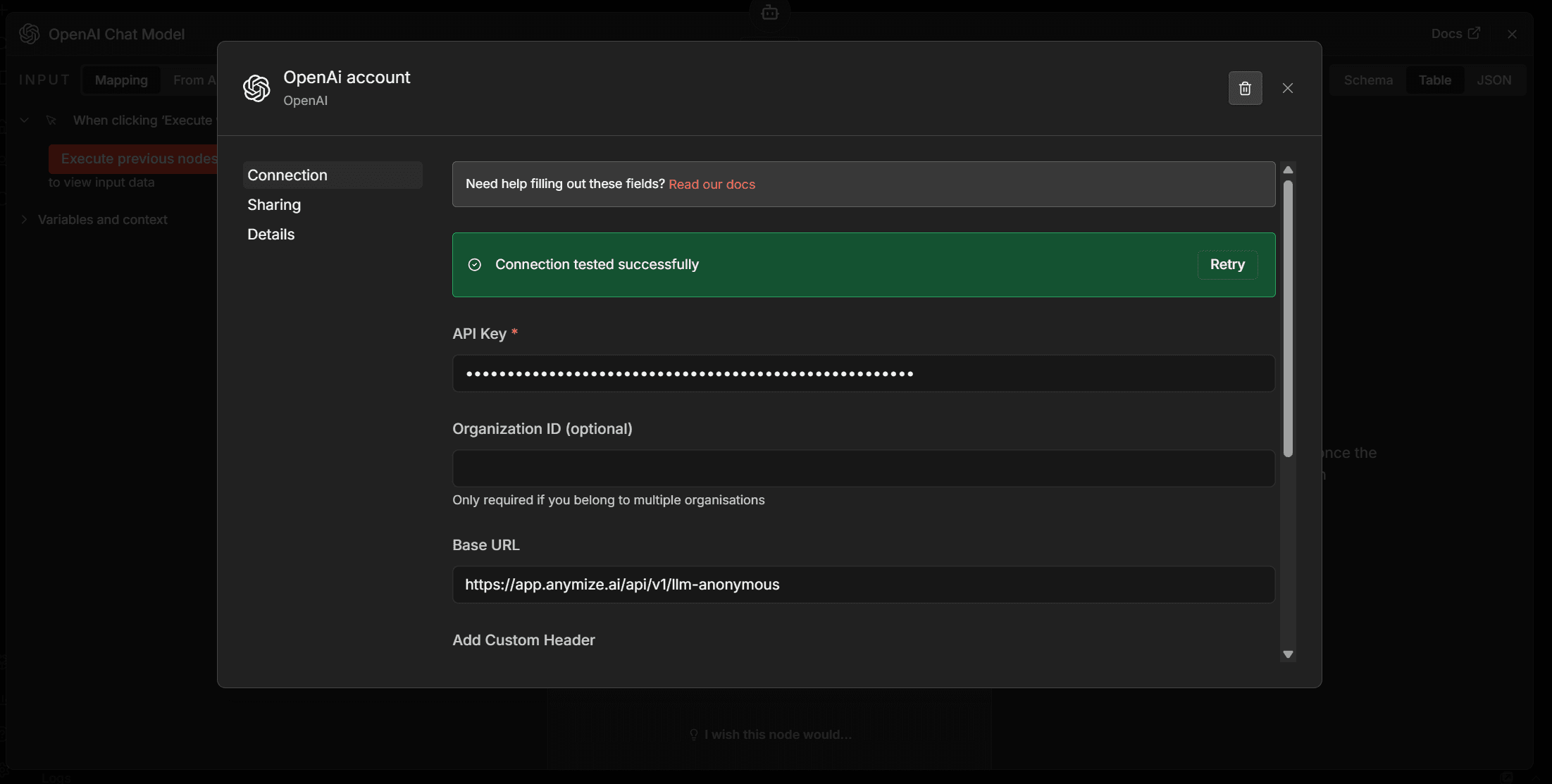
Beispiel: OpenAI Chat Node in n8n mit anymize Base URL
1. Offne den OpenAI Chat Node in n8n und setze die Base URL auf https://app.anymize.ai/api/v1/llm
2. Trage deinen anymize API-Key als Bearer Token ein
3. Wahle ein Modell (z.B. fountain-1.0) und starte deinen Workflow